· ARUM Team · LED Knowledge
LED Strips for the Kitchen — How to Choose and Install Them Right
A complete guide to selecting and installing LED strips in the kitchen, including ideal positions, brightness levels, product recommendations, and maintenance tips.
Why Kitchens Need a Special Type of LED Strip
The kitchen is unlike any other room in your home — it’s a real workspace. You need enough light to see detail, identify food colors accurately, and work safely with knives and heat sources. LED strips in the kitchen aren’t just decoration; they’re a functional tool.
This guide will help you choose and install LED strips that actually work in a kitchen, whether you’re going under the cabinets, over the shelves, or along the island counter.
Step 1: Choose the Right Color Temperature
4000K–5000K (Cool White / Daylight) Is the Right Call
Kitchen lighting should be in the natural-to-cool white range because:
- True color rendering — see the actual color of meat, vegetables, and seasonings
- Spot dirt easily — stains and residue on counters and dishes are visible under natural light
- Reduces fatigue — natural white light keeps you alert during long cooking sessions
Avoid warm yellow light (2700K) in the kitchen — it distorts food colors and makes it harder to see what’s clean and what isn’t.
Step 2: Choose the Right Brightness
Target 500–900 Lumen/meter or Higher
Brightness scale for kitchens:
- 500–700 lm/m — suitable for small to medium kitchens with overhead lighting already in place; install under upper cabinets
- 700–900 lm/m — for countertop task areas where you need full working light
- 900+ lm/m — large kitchens or precision cooking areas
Tip: If you already have overhead lighting, 500–700 lm/m strip lighting adds great supplemental task light. If the strips are your primary light source over the counter, go 700–900 lm/m or higher.
Step 3: Choose Your Installation Position
Under-Cabinet (Most Popular)
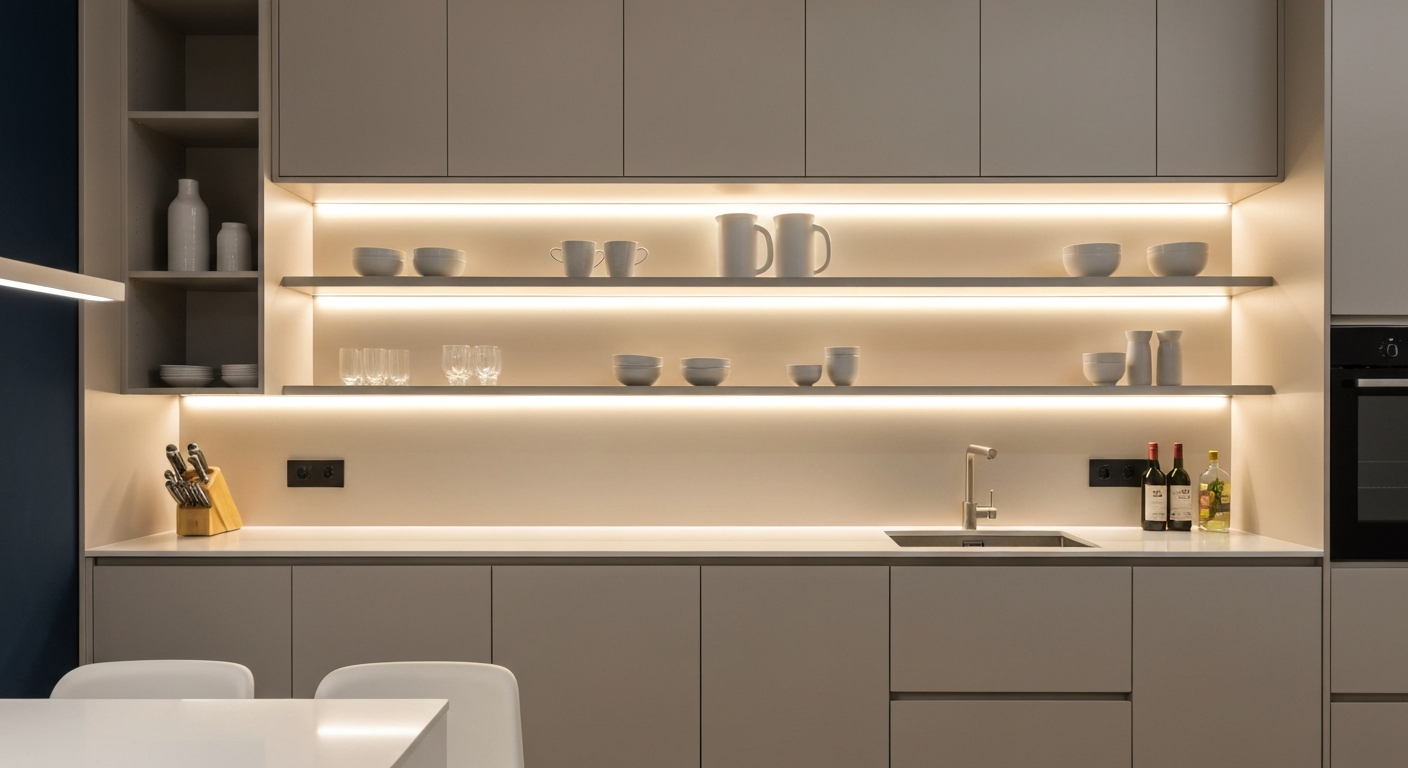
The best position in a modern kitchen:
- Shines directly onto the work counter below
- Makes it easy to see exactly what you’re cutting and preparing
- Keeps cables hidden
- Clean to install — use an Aluminum Profile to tuck the strip neatly under the cabinet
How to install:
- Measure the counter length (e.g., 1.5 meters)
- Buy matching aluminum profile + LED strip
- Slide the strip into the profile
- Drill mounting holes or use 3M tape to attach the profile under the upper cabinet
- Connect the power cable to a controller hidden inside or behind the cabinet
Over Shelves
- Adds light to open shelves so you can see what’s stored
- Use with a Smart Light Sensor for automatic on/off
Island Counter
- If you have an island counter, strips along both sides of the base create safe, stylish task lighting
Step 4: Choose the Right Strip Type
1. COB LED Strip (Recommended)
- No visible dots — light flows continuously from the entire strip
- Even, uniform output — ideal for task lighting where consistency matters
- Example: COB LED Strip 528C 24V for medium-sized kitchens
2. SMD LED Strip (Budget-Friendly)
- Individual LEDs are visible as dots from certain angles
- Lower cost than COB
- Works well if covered by a frosted profile diffuser
3. IP67 or IP68 (Waterproof)
- Kitchens get splashed — if you’re installing near the sink, always go waterproof
- COB LED Strip IP67 24V — reliable waterproofing without sacrificing light quality
- COB LED Strip IP68 Silicone 24V — maximum water resistance
Step 5: Installation — Beginner Friendly
What You Need
- Aluminum profile to conceal the strip
- LED strip of your choice
- Power supply (calculate: total LED wattage × 1.2)
- Controller (if you want dimming)
- 3M tape or screws for mounting
- Drill (for screw mounting)
Installation Steps
1. Clean the surface Cabinet bottoms collect dust. Wipe clean so the 3M tape sticks properly. If screw-mounting, drill pilot holes.
2. Mount the Aluminum Profile first
- Cut to length
- Drill and screw to the underside of the cabinet
- Use M4 or M5 screws with plugs
3. Slide the LED strip into the profile
- Cut only at the marked cut lines — never cut randomly
- Press firmly into the profile
4. Connect the Power Supply
- Red wire = + (positive)
- Black wire = − (negative / ground)
- Use terminal connectors; secure tightly
5. Add the Controller (if using)
- Input: from Power Supply
- Output: to LED strip
- Allows dimming and on/off control
6. Test
- Plug in the power supply
- Switch on the controller
- The strip should illuminate fully and evenly
- Adjust dimmer if needed
Step 6: Maintenance
Extend the Life of Your Kitchen LED Strip
- Keep moisture away — even IP67 strips shouldn’t be directly flooded
- Dust monthly — use a dry cloth to wipe the profile surface
- Inspect wiring every few months — look for frayed or loose connections
- Keep away from direct heat — never install directly above the stove or burners
- Don’t force the controller off — it’s fine to leave on daily; LED strips are designed for continuous use
Product Summary for Kitchen Installation
| Component | Recommended | Approx. Price |
|---|---|---|
| LED Strip | COB LED Strip 528C 24V (Cool White) | ~฿500/meter |
| Aluminum Profile | LED Aluminum Channel | ~฿200/meter |
| Power Supply | ARUM Hyper 24V 100W | ~฿1,200–1,500 |
| Controller | Simple On/Off Dimmer | ~฿300–500 |
| Waterproof (near sink) | COB LED Strip IP67 24V | ~฿600/meter |
Frequently Asked Questions
Q: I installed under-cabinet strips but the counter is still dim — why?
A: Common causes:
- Brightness too low (below 500 lm/m) — consider adding more strips or upgrading to a higher-output model
- Upper cabinet is mounted too high — the strip is too far from the work surface
- Aluminum profile isn’t directing light forward — look for a profile with a wider flange
Q: How long will kitchen LED strips last?
A: Quality LED strips typically last 50,000–100,000 hours — that’s 10–15 years if run 12 hours per day. Actual lifespan depends on product quality and proper heat management.
Q: How much strip do I need for a small kitchen?
A: Based on counter length:
- 1-meter counter → 1–1.5m of strip
- 1.5–2 meter counter → 1.5–2m
- 2m+ counter → run the full length
Not sure which strip is right for your kitchen? Contact the Arumstores team — we offer free consultations and will calculate the right power supply size for your setup.